
These programs are for Windows, Linux and macOS computers: on your phone you can read the manuals and save this page to download them later.

Windows · Free · v1.0.0

Modbus Tester

A tool to test and commission Modbus devices. It works as a master (polling PLCs, instruments, gateways) and as a slave (simulating a device to be read by a PLC or SCADA), over Modbus TCP, Modbus RTU on a serial port, and RTU over TCP for serial/ethernet converters.

  • FC01–FC04 reads, single or polled; FC05, FC06, FC15, FC16 writes; FC43 identification
  • 16, 32 and 64-bit values, float and double, hexadecimal, binary and ASCII, in all four byte orders
  • Debug HEX: every byte sent and received, with the frame decoded
  • Flow analyzer: tells you what is wrong with the communication and what to check
  • Slave with editable tables and simulated values
  • English and Italian interface, light or dark theme
Other files: Italian setup · English MSI · Italian MSI · Italian manual · SHA-256

Requirements: 64-bit Windows 10 or 11 and the Microsoft .NET 10 Desktop Runtime (x64), which the setup checks before installing. Modbus RTU needs a serial port (e.g. a USB-RS485 adapter) or a serial/ethernet converter.

On first launch Windows SmartScreen may show “Windows protected your PC”: choose More info → Run anyway. Free to use, including commercial use; distributed only from this website and the Microsoft Store. License.

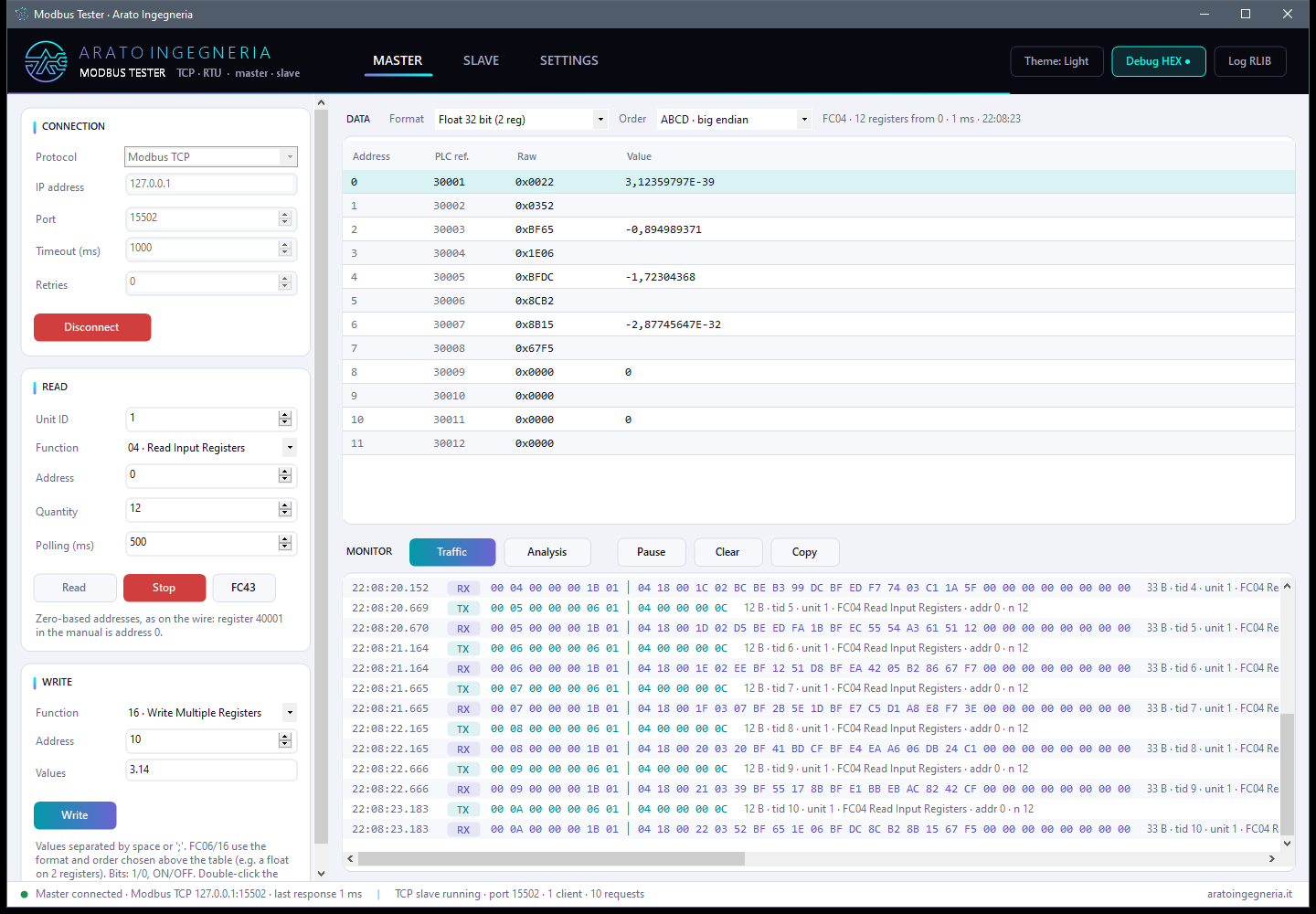
Modbus Tester: Master page while polling, with the data table and the traffic monitor
Windows · Linux · macOS · Free beta · v1.0.0 beta 12

Albatros Beta

An email and calendar program that stays fast even with very large archives: search is instant across all your mail. Messages stay on your computer, in ordinary .eml files you can copy and keep; every mail folder is a real folder.

  • Multiple accounts, IMAP or POP3, with password-free “Sign in with Google” and “Sign in with Microsoft”
  • Instant search across the whole archive, however large
  • Calendar synced with Google, Microsoft 365 / Outlook.com and CalDAV (Nextcloud, iCloud, Fastmail…), with reminders
  • Tasks synced with Microsoft To Do and CalDAV, also created from an email
  • Contacts linked to Google, Microsoft and CardDAV
  • Preview of attached PDFs and images, also in the compose window
  • OpenPGP and S/MIME signing and encryption built in, no add-ons needed
  • Import from Thunderbird and Outlook, backup and transfer to another computer
  • Interface in nine languages, light and dark theme; installers for Debian/Ubuntu and macOS
  • Updates itself, checking the digital signature of every new version
  • RSS and Atom feeds, newsgroups; rules for new mail and saved searches

Other Linux distributions, or if you prefer an archive to unpack: linux-x64.tar.gz · linux-arm64.tar.gz · osx-arm64.tar.gz · osx-x64.tar.gz

Manual in PDF: English · italiano · français · Deutsch · español · 日本語 · 简体中文 · русский · العربية · SHA-256

Installation: on Windows unpack the zip and start Albatros.exe. On Debian, Ubuntu and Mint double-click the .deb (or sudo apt install ./Albatros-….deb): Albatros appears in the applications menu. On macOS open the .dmg and drag Albatros into the Applications folder. The beta is not digitally signed yet: on first launch Windows may show “Windows protected your PC” (More info → Run anyway) and macOS may block the app (System Settings → Privacy & Security → Open Anyway). Details are in chapter 2 of the manual.

Beta version, free, for testing: it may contain bugs. Back up your mail before importing it from another program. Free to use, including commercial use; distributed only from this website. License · third-party components. Reports and suggestions are welcome at info@aratoingegneria.it.

Albatros: main window with folders, message list with stars and labels, message preview with the attachment

Need a custom tool?

We build test, diagnostic and supervision software for your devices and protocols. Let us know about issues or requests for the programs on this page too.

Get in touch →